Generative Engine Optimization · 5 min read · 3 Sept 2026
Google Now Shows AI Search Impressions: 5 GEO Actions to Take
Google's new Search Console report reveals where pages appear in AI Overviews and AI Mode. Use these five actions to turn impressions into a practical GEO baseline.
Google has given website owners a clearer view of AI-search visibility. Its Generative AI performance report in Search Console now shows when pages receive impressions in AI Overviews and AI Mode.
The report is useful—but narrow. It shows visibility, not complete GEO performance. Businesses still need citation, referral, accuracy, and conversion data to understand whether AI search is creating value.
Key takeaways
- Google reports AI-search impressions by page, country, device, and date.
- The report does not provide click, query, click-through-rate, or position data.
- An impression is evidence of visibility, not proof of authority, ranking, or revenue.
- GEO measurement should connect visibility to citations, visits, and qualified enquiries.
What changed in Google Search Console?
As of August 31, 2026, Google says its Generative AI performance report has rolled out to websites worldwide. The report covers supported generative features in Google Search, currently AI Overviews and AI Mode.
What the report includes
Website owners can review AI-search impressions across four dimensions:
- Pages
- Countries
- Devices
- Dates
This answers a useful first question: which pages are being shown as links inside Google's generative search experiences?
What the report does not include
The report does not show clicks, click-through rate, average position, or the queries that triggered an impression. Its data also remains part of the Web search type in the main Performance report.
Treat the report as a visibility lens. Do not turn one rising line into a claim that GEO revenue or authority increased.
Why does this matter for GEO?
Until now, teams often had to infer whether a page appeared in Google's AI features. Page-level impression data creates a more defensible starting point for Generative Engine Optimization.
You can identify pages receiving AI visibility, compare their patterns, and decide what deserves closer review. You still cannot see the answer, citation context, or customer outcome from this report alone.
What should you do with the new data?
1. Save a baseline before changing content
Export the report and record impressions by page, country, device, and date. Use at least a few weeks of data before treating a movement as a trend.
2. Inspect the pages already earning impressions
Check whether each visible page gives a direct answer, names its author, supports changing claims, and links to the next useful page. Preserve what makes the page helpful instead of rewriting it only to increase a metric.
GAiO Engine's guide to why AI search cites some websites explains the access, clarity, evidence, and authority layers behind citation readiness.
3. Compare visibility by audience context
Country and device differences may reveal where a page is being surfaced. Investigate the reason before localizing content or changing design. A difference is a clue, not proof of causation.
4. Add citation and referral evidence
Google's report covers Google Search—not every AI platform. Bing's AI Performance reporting can show citation totals, cited pages, and sample grounding queries across supported Microsoft experiences.
OpenAI says ChatGPT search referral links include utm_source=chatgpt.com, which publishers can track in analytics when a user clicks through. OpenAI's publisher guidance also explains the role of OAI-SearchBot in search discovery.
5. Connect visibility to a business outcome
Tag the assessment, booking, and contact actions on pages receiving AI visibility. Review:
- Engaged visits
- Assessment starts
- Completed forms
- Qualified enquiries
- Booked consultations
- Assisted conversions
The useful question is not “Did impressions rise?” It is “Did the right audience discover a useful page and take the next step?”
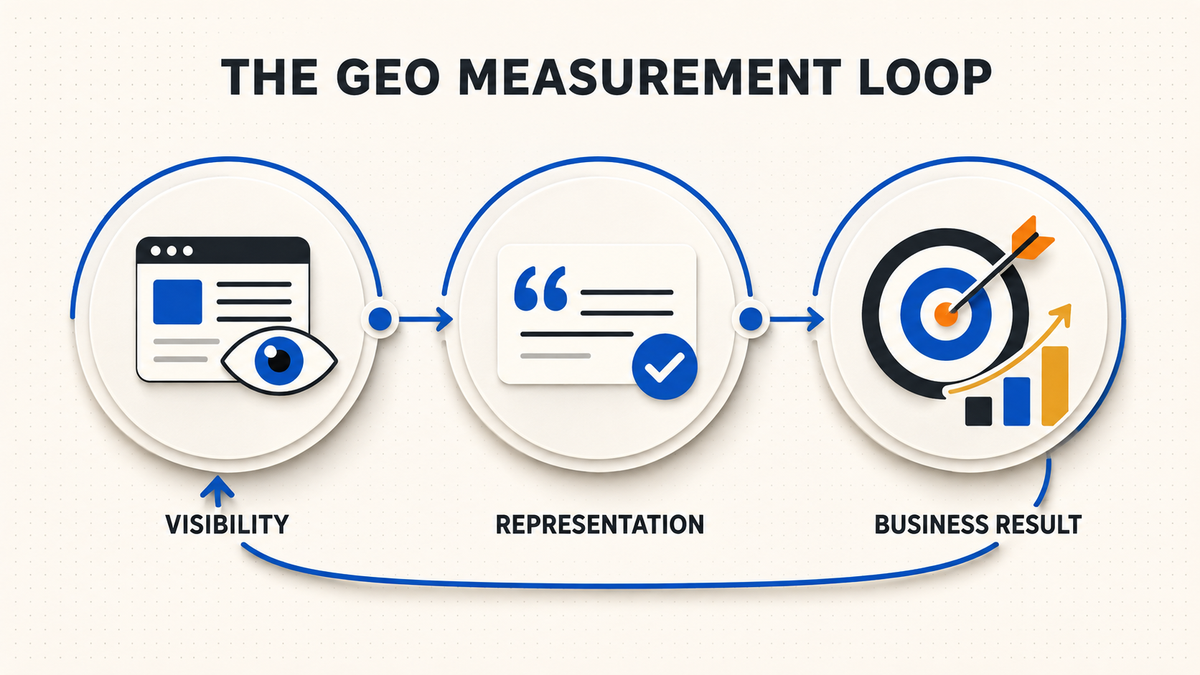
Use this simple GEO measurement loop
Visibility
Track AI-search impressions and the pages being surfaced.
Representation
Review whether AI answers mention the business accurately and cite an appropriate source.
Business result
Measure referral visits, engagement, assessments, enquiries, and revenue where attribution is available.
Repeat the same review monthly with a stable set of customer questions. Record observations separately from conclusions; AI answers can change by platform, prompt, account, location, and time.
Frequently asked questions
Do more AI impressions mean a higher AI ranking?
No. An impression means a link to your page was shown in a supported Google generative feature. The report does not provide a universal AI rank or prove authority.
Does Search Console report ChatGPT or Claude visibility?
No. The report covers supported generative features within Google Search. Other platforms require their own available reporting, referral analysis, and consistent manual testing.
Should I rewrite every page with zero AI impressions?
No. First confirm that the page is indexable, useful, relevant to a real customer question, and supported by evidence. A zero may also reflect insufficient data or low demand, not necessarily poor content.
Turn AI visibility into a measurable GEO program
GAiO Engine's GEO services help businesses connect technical access, answer-ready content, evidence, authority signals, and AI-visibility measurement.
No agency can guarantee placement in Google AI, ChatGPT, Claude, Gemini, Grok, Perplexity, or another independent system. We build and measure the conditions that make a business easier to discover, understand, and evaluate.
Start your GAiO Engine readiness assessment to find the highest-priority gaps in your current website.
Discussion
Leave a signal.
Short notes welcome. Approved comments show here after submit.
0 comments
No comments yet. Start the thread.